Overview
This guide is for providers who want to turn customer feedback into more bookings. By the end you’ll know how to read and respond to reviews, handle a negative review with confidence, understand how disputes are resolved, and use your portfolio and certificates to build trust that wins work.
See your reviews
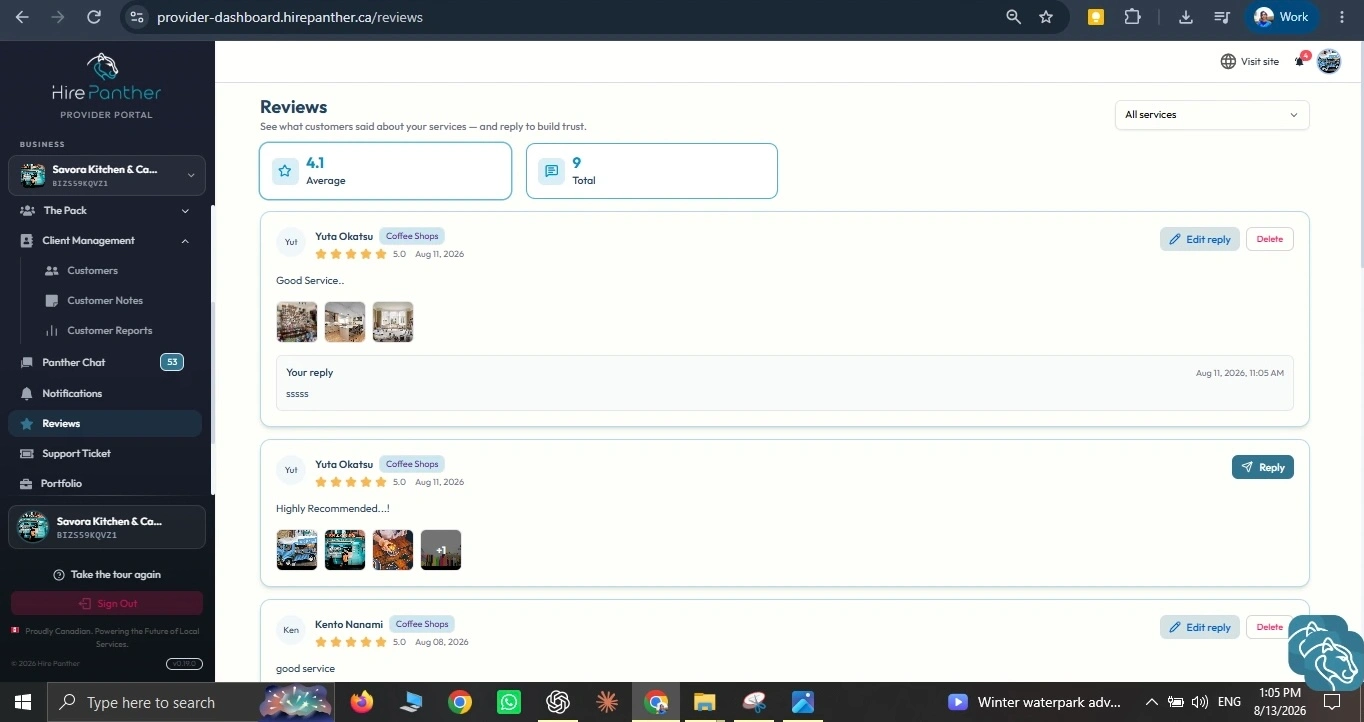
Your reviews live in the Reviews section of the Provider Portal sidebar. Customers can rate and review a booking once it’s completed, so this is also where you’ll see your overall rating.
1. Open Reviews
Select Reviews from the sidebar on the left of your workspace. You’ll see each review with its star rating, the customer’s comment, and the booking it came from.
2. Read the review in context
Before you reply, check the booking details — the service, the date, and any messages you exchanged. Context helps you respond accurately instead of guessing at what happened.
Reply to reviews
1. Choose Reply
On the review, select Reply.
2. Write a calm, professional response
- Thank the customer for taking the time to leave feedback, even when it’s critical.
- Address the specific point they raised — don’t dodge it.
- Keep it short and factual. Warm, not defensive.
3. Post your reply
Save your reply. It appears beside the review and is visible to future customers who look at your profile.
Your replies are part of your public profile. A thoughtful reply — especially to a negative review — tells customers you take feedback seriously.
Handle a negative review gracefully
A low star rating can sting, but how you respond matters more than the rating itself.
- Don’t take it personally. The review is about the service, not you as a person.
- Acknowledge the issue. If the customer has a fair point, say so plainly.
- Apologize where it’s warranted. A genuine “sorry the booking ran late” goes a long way.
- Offer a fix. Mention a redo, a partial refund, or a discount on their next booking.
- Move details to Messages. Sort out the fix in Messages rather than airing private details in a public reply.
- Never argue in public. A back-and-forth argument is the one thing that reliably hurts trust.
Understand the dispute path
Most issues never reach a dispute — they’re solved by messaging the customer and agreeing on a fix. When that doesn’t work, HirePanther has a formal dispute path.
- The customer (or you) opens a dispute from the affected booking.
- Both sides describe what happened and what outcome they’re seeking.
- Each side shares evidence — chat messages, photos, and the booking reference.
- HirePanther reviews the details and mediates toward a fair outcome.
Outcomes can include a full or partial refund, a redo, or upholding the original booking. You can view and respond to disputes from the Disputes section of your dashboard.
Keeping your communication and payments on HirePanther means there’s a clear record if you ever need to escalate. See “Disputes: how they’re resolved” for the full process.
Build trust signals
Reviews are your customers’ word. Your portfolio and certificates are your own — but no less powerful.
1. Add portfolio photos
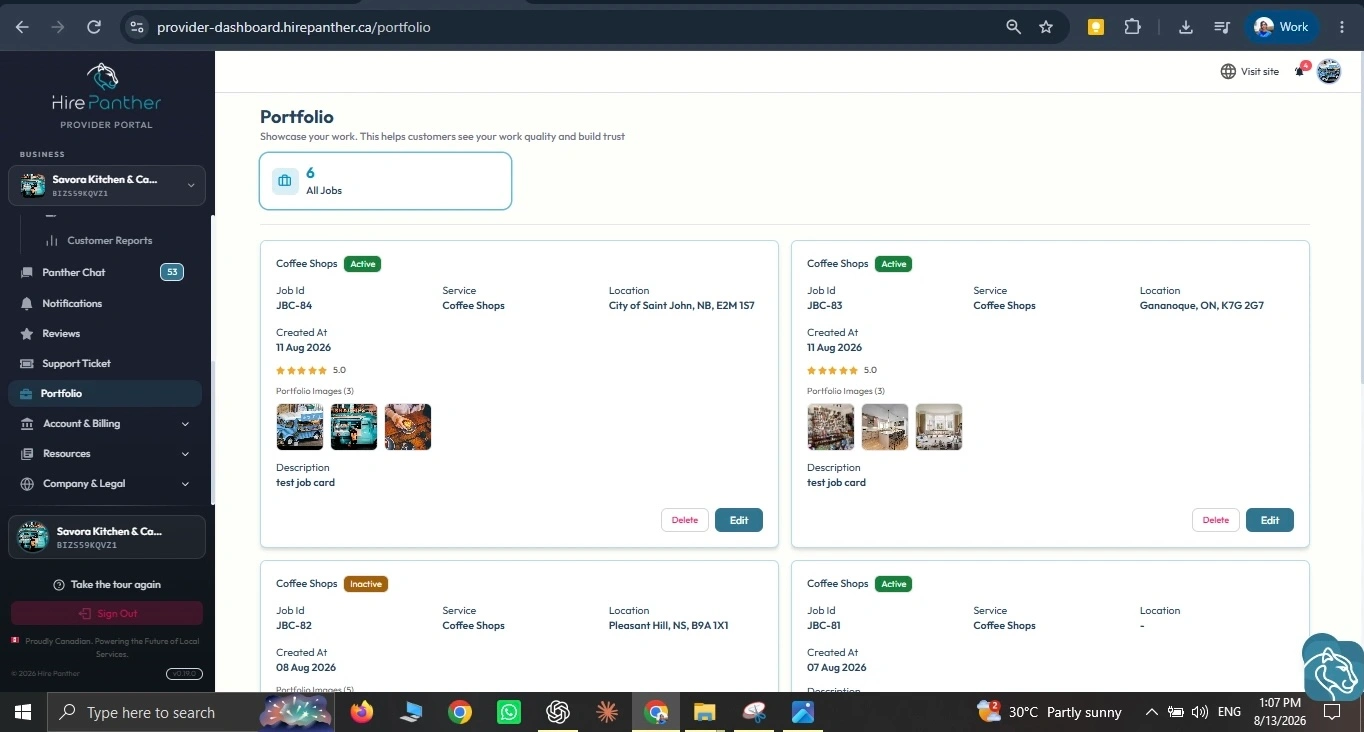
Open Portfolio in your sidebar and select Add. Upload clear, well-lit photos of your past work, add a title and short description, and save. The strongest items show the kind of work a customer is about to book — a finished bathroom, a cleaned office, a tidy backyard.
2. Add certificates
Go to the Certificates area of your business profile and select Add Certificate. Enter the details and upload proof where requested. Licences, trades qualifications, and safety certifications back up the claims you make in your listings.
Why they matter
Customers choose between providers they can’t meet in person. A portfolio full of real work and verified certificates answers the question “can I trust this person?” before you ever message them.
Why reviews help your ranking
Reviews do more than sit on your profile — they help you show up in search. Providers with strong ratings and a steady stream of recent reviews tend to rank higher when customers search for a service in their area, alongside other factors like a complete profile and accurate availability. See the article on search visibility and analytics for the full picture.
Worked example
Andre runs a plumbing business in Toronto. After a booking that ran late because the previous callout overran, a customer left a 3-star review: “Good work, but the plumber was almost an hour late with no warning.”
Andre doesn’t argue. He replies: “Thank you for the honest feedback, and I’m sorry we kept you waiting — we should have called to update you. I’d like to offer 15% off your next booking. — Andre.” Then he messages the customer directly to arrange the discount.
Later that week he opens Portfolio, adds three photos of a recently finished bathroom renovation titled “Full bathroom reno — Leslieville”, and uploads his gas-fitter licence under Certificates. Between a calm reply and a stronger profile, the review reads as one bad day — not the whole story.
Common issues
- A review you think is unfair. Reply calmly and factually, then message the customer. If a review breaks community guidelines, report it from the review and contact support.
- A customer says they’ll open a dispute. Don’t ignore it. Offer a fix in Messages first — most disputes never happen when both sides talk. If it does open, respond with clear evidence.
- Portfolio photos look dark or blurry. Retake them in good light and lead with your strongest, most recent work.
- A certificate is close to expiring. Update it before it lapses so your qualifications stay verified.
- You don’t know what to say to a negative review. Short and sincere beats long and defensive. Thank them, address the point, and offer a fix.
Related
- Setting up your business profile
- Creating services and setting pricing
- Troubleshooting and FAQ
- Leaving & managing reviews
Was this helpful?
Thanks for your feedback!