Overview
This guide is for providers who want more customers to find their services on HirePanther. You’ll learn how services appear in customer search, what moves you up in the results, and how to read your analytics so you know what’s working.
How providers appear in customer search
When a customer searches HirePanther, they type what they need and a location — for example “landscaper in Hamilton” or “house cleaning in Mississauga.” HirePanther matches your service listings against that search and shows the best fits.
Your service appears in search based on how well your listing matches what the customer asked for. That includes your service category, title, description, service area, and your overall reputation on the platform.
What improves your ranking
HirePanther ranks matching services to show customers the most relevant and trustworthy providers first. Several things help you rank higher:
- A complete profile — a finished business profile with your logo, cover photo, and a clear bio tells customers you’re established.
- Good photos — clear, well-lit images of your work make a listing more useful and appealing.
- A clear service area — the more accurate your service area, the better you’ll match customers searching nearby.
- Accurate pricing — honest prices reduce surprises and keep customers happy after booking.
- Reviews — a steady flow of good reviews builds trust and signals reliability.
- Response speed — answering booking requests and messages quickly tells HirePanther you’re active and available.
None of these is a single magic fix. Together, they make your listing more relevant and more trustworthy, which is how you rise in the results.
SEO fields on each service
When you build a service listing, you’ll fill in a few fields that help match customer searches. Think of them as the words a customer might type when looking for what you offer.
1. Service title
Use the name a customer would actually search for — for example “Lawn mowing” rather than “Turf maintenance package A.” Keep it clear and specific.
2. Description
Describe what’s included, what to expect, and what makes your work different. A complete description gives HirePanther more to match against and gives customers a reason to choose you.
3. FAQs
Common questions let you answer things like travel fees, what’s included, and how long the work takes. Good FAQs help customers book with confidence and reduce back-and-forth messages.
You can edit these fields anytime from Services in your Provider Portal. See “Creating services and setting pricing” for the full walkthrough.
Service Boost
If you want to rise higher faster, Service Boost is a paid way to promote a specific service. You choose a boost package — Basic Boost, Growth Boost, or Elite Boost — and your listing gets extra placement in search results. Boost credits from your membership plan can be applied at checkout.
Boosting works alongside the tips above: a strong listing that already ranks well naturally gets even more from a boost. See “Boosting a service with Service Boost” for details.
Understanding the analytics dashboard
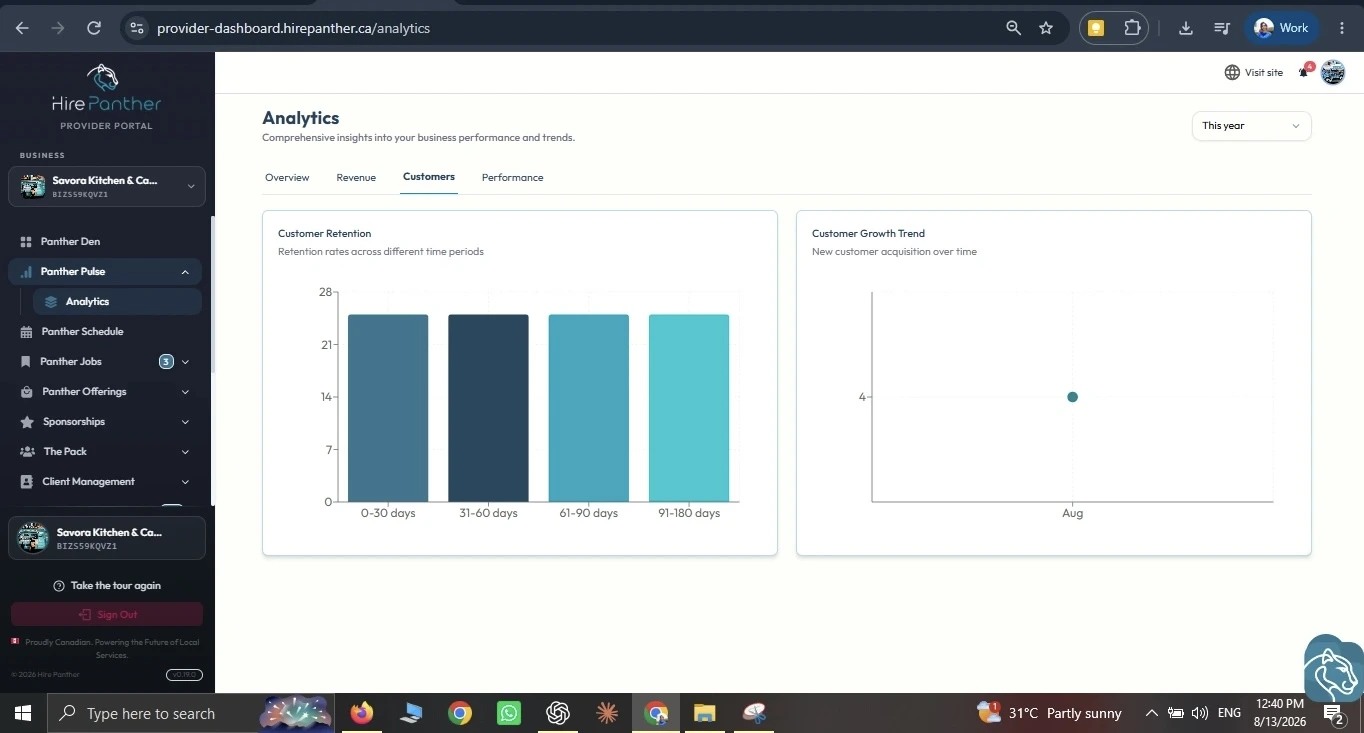
Your analytics dashboard shows how your business is performing, so you can see what’s working and what to improve.
1. Overall performance
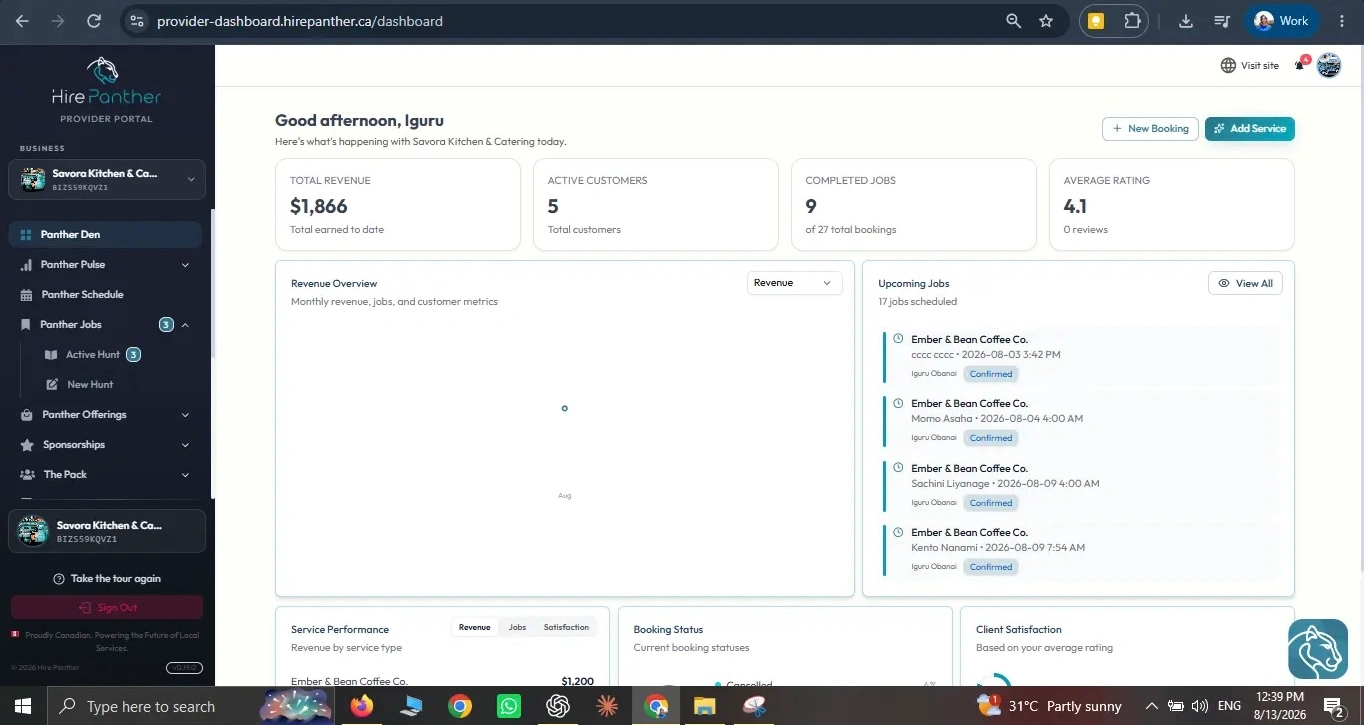
The top of the dashboard gives you headline numbers — total revenue, active customers, and how fast you respond to requests — over the period you choose. This is your quick health check.
2. Revenue by service
A breakdown shows how much revenue each service drives. You’ll often spot one service that earns most of your income and another that’s popular but thin on detail. That tells you where to focus your effort.
3. Customers
The customers view shows who’s booking you and how often. Look for repeat customers — they’re a sign your work is building trust, and they’re the easiest bookings you’ll ever get.
Worked example
Dan runs a landscaping business in Hamilton. He opens the analytics dashboard and looks at Revenue by service for the last three months. Lawn mowing brings in most of his income, while garden cleanup earns far less — even though he gets just as many requests for it.
He opens the garden cleanup service in Services and sees why: the description is one thin sentence, the photos are old, and there are no FAQs. He rewrites the description to explain what’s included and what customers should expect, uploads fresh photos, and adds a couple of FAQs about haul-away fees. A few weeks later, the service is ranking higher in search and booking more often.
Common issues
- My service isn’t showing up in search. Check that your service area and category are set correctly and your service is published — draft listings don’t appear. A complete business profile also helps you show up at all.
- My ranking dropped. Look at your reviews and response speed. A slow reply to requests or a recent bad review can pull you down. Fix the cause and your ranking usually recovers.
- I don’t understand what a metric means. Compare the same period last year to get context for the number, and check the support articles in the portal for a deeper walkthrough of each metric.
- My service description is short and I don’t know what to write. Look at the questions customers ask you most often and answer them in the description and FAQs.
- I want to rank higher right now. Service Boost gives you paid placement while you work on the longer-term ranking factors above.
Related
- Creating services and setting pricing
- Boosting a service with Service Boost
- Reviews, ratings and building trust
- Understanding your analytics dashboard
Was this helpful?
Thanks for your feedback!